Auto Repair Shop Scheduling: How to Load Bays Without Overbooking
Auto repair shop scheduling that works: capacity math (bays x hours x efficiency), appointment types, buffers, waiters vs drop-offs and a sample day.
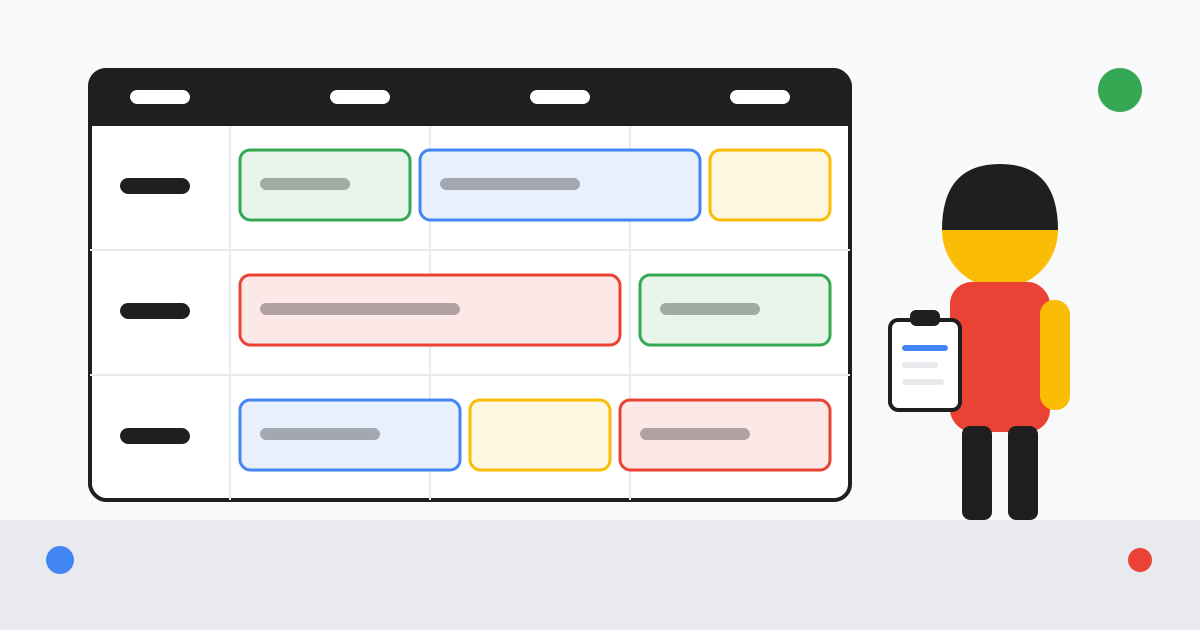
Auto repair shop scheduling fails in one of two ways. The board looks full, the lobby is full, and by 2 p.m. three cars have not been touched because a diagnosis ran long and the parts for the first job arrived wrong. Or the board is careful, nobody waits, and the owner looks at the day's sales and wonders where the hours went. The fix for both is the same: schedule hours, not cars, and build the day from a capacity number you can defend.
This guide gives you that method. The figures in the examples are invented to show the arithmetic; put your own numbers in.
Key takeaways
- Capacity is technicians × available hours × realistic efficiency, minus a buffer. It is almost always smaller than the owner assumes.
- Define four or five appointment types with a standard duration each, and book them against technician hours rather than against bays.
- Hold back a fixed block of hours each day for inspection findings and walk-ins; release it the same morning if it is still free.
- Waiters get the earliest slots and known-duration work; drop-offs give you the room to sequence diagnosis and parts.
- Assign jobs to technicians by skill and to bays by equipment, then review the board at three fixed times a day.
Auto repair shop scheduling starts with capacity: bays × hours × efficiency
Bays are the wrong starting point, because a bay without a technician produces nothing. Count technician hours first. For each technician, take the hours they are on the clock, subtract lunch, breaks, clean-up and the time they spend on things that are not billable work (moving cars, looking for parts, talking to the advisor). What remains is available hours. Then apply an efficiency factor: how many billable hours they actually produce per available hour, measured over the last month. If you are not measuring that yet, technician efficiency vs productivity explains how.
Worked example (synthetic figures) Take an invented shop with three technicians and four bays, open 8 a.m. to 5:30 p.m. Each technician is on the clock 9 hours, loses 1 hour to lunch and breaks and 0.75 hours to non-billable movement, leaving 7.25 available hours. The shop's measured efficiency last month was 0.85 billable hours per available hour. Daily capacity: 3 × 7.25 × 0.85 = 18.5 sellable hours, not the 27 that "three techs, nine hours" suggests. Reserve 3.5 hours for findings and walk-ins and the advisor has 15 hours to book in advance.
The fourth bay in that example is useful but not productive on its own: it is where a car sits while parts arrive or an approval is pending, which is exactly what it should be used for. If you have more bays than technicians, treat the spare bay as a parking space that keeps productive bays clear.
| Step | Synthetic three-technician shop | What you measure in your shop |
|---|---|---|
| Hours on the clock per technician | 9.0 | Timeclock |
| Less breaks and lunch | −1.0 | Policy |
| Less non-billable movement | −0.75 | Time tracking: clocked-on-job vs clocked-in |
| Available hours per technician | 7.25 | |
| Efficiency (billed ÷ available) | 0.85 | Last month's billed hours ÷ available hours |
| Sellable hours per day (3 technicians) | 18.5 | |
| Buffer for findings and walk-ins | −3.5 | How often you ran late last month |
| Hours the advisor may book in advance | 15.0 | Recalculate monthly |
Appointment types and how long each really takes
Booking "a brake job" means nothing to a schedule until it has a duration. Define a short list of appointment types and give each a standard booking time that includes the inspection and the write-up, not only the labor guide figure. Five types cover most general repair shops:
- Maintenance (oil service, rotation, filters, inspection): known duration, ideal for waiters.
- Diagnosis (check-engine, noise, electrical): book a fixed diagnostic block, then schedule the repair separately once the customer approves.
- Repair with known parts (brakes, battery, belts, suspension when parts are confirmed): book the labor time plus a margin for seized hardware.
- Inspection only (pre-purchase, pre-trip, used-car check): fixed duration with a report at the end.
- Carry-over: yesterday's cars that are waiting on parts or approval; they consume bay space and some technician time, so they belong on the board.
Review the standard durations every quarter against your actual clocked times by type. If maintenance appointments routinely run over because the inspection finds work, the fix is not a longer slot; it is a decision rule for whether findings are done the same day or booked back, which is covered below.
Buffers: why a fully booked board is an overbooked board
A board with every hour pre-sold has no room for the three things that happen every day: the inspection finds a leaking axle seal, the parts store sends the wrong caliper, and a regular customer limps in with a dead alternator. If you have no buffer, each of those pushes a booked job to tomorrow, which pushes tomorrow's work, and by Thursday you are apologising to everyone.
The buffer is a block of hours per technician that is not bookable in advance. In the worked example it is 3.5 hours across three technicians. The rule that makes it work is the release rule: at the morning huddle, any buffer that is not already claimed by findings or carry-over is released to the advisor for same-day work and walk-ins. Buffer that is never used is a sign you can shrink it; buffer that is always gone by 10 a.m. is a sign to grow it or to look at why diagnosis is running long.
Decision rule for inspection findings Same-day if the parts are on the shelf or arrive within two hours and the work fits in the released buffer. Otherwise, book it as its own appointment and record the finding against the vehicle so it is not lost. The customer gets a clear answer either way, which is what they want more than speed.
Waiters vs drop-offs: scheduling each without stalling the lobby
A waiter is a promise: the car will be finished while the customer watches the clock. Only make that promise for appointment types with a known duration, and only at times when a technician will be free at the appointment minute, not ten minutes later. Put waiters first thing in the morning and right after lunch, when technicians are starting fresh rather than finishing something, and cap them to one per technician per slot.
Drop-offs are where your flexibility lives. A car that is yours until 5 p.m. can be inspected first, diagnosed second and repaired after the parts arrive, in whatever order keeps technicians busy. Ask every drop-off customer for a real deadline ("do you need it by 3 or by end of day?") and record it on the work order, because "whenever" turns into "I need it now" at 4:15. The five-minute check-in is where that question belongs.
One more rule: do not let the lobby set the schedule. If a waiter's inspection finds two hours of additional work, the advisor presents it with a choice of "we can do it now and you wait another two hours, or we book you back Thursday at 8". Letting the waiter silently become a two-hour drop-off is how afternoons collapse.
Assigning bays and technicians
Assign jobs to technicians first, bays second. Technicians have skills and certifications; a drivability diagnosis goes to the technician who can do it in one hour rather than three, and routine maintenance goes to the technician who is fastest at it or who is learning. Bays have equipment: the alignment rack, the heavy-duty lift, the flat bay where you do static calibrations or keep a car waiting for parts. Match the job to the bay only after the technician is chosen.
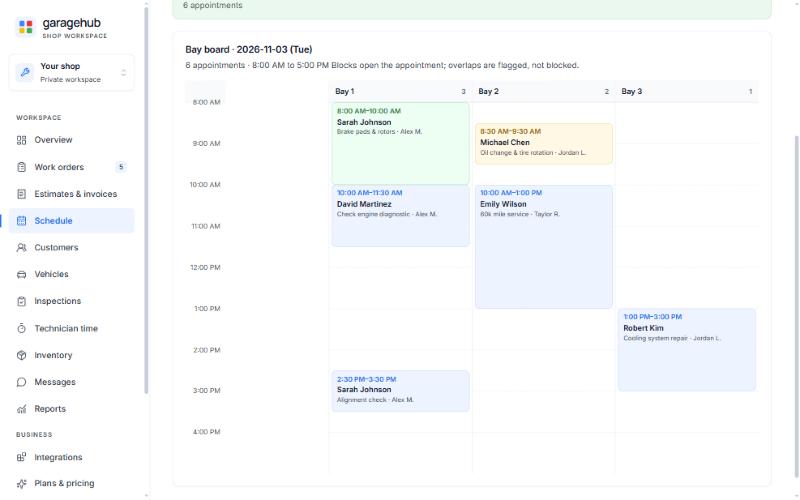
Keep the pairing visible. A board with a row per technician and the day's jobs in sequence lets everyone see who is loaded and who is light at a glance. Some shops run it on a whiteboard; others use the schedule board in their shop software. GarageHub, for instance, has a bay board and a week view built for this; the features page shows how it looks. Whatever the tool, the discipline is the same: every car in the building is on the board, including the ones waiting on parts.
A sample day on the board
Here is the synthetic three-technician shop from the worked example, booked to 15 hours with a 3.5-hour buffer, as it might look at 7:45 a.m. before the doors open.
Notice three things. The waiters are at the start of a block, never after a diagnosis. The buffers sit mid-morning and early afternoon, where inspection findings from the preceding jobs are most likely to appear. And the carry-over job is on the board with its parts status, so nobody is surprised when Technician B is unavailable until lunch.
Daily and weekly habits that keep the board honest
- 7:45 huddle Walk the board with the technicians. Confirm parts for every booked repair are on the shelf, assign the carry-overs and release unclaimed buffer.
- 11:00 check Compare each technician's progress to the plan. Anything running more than 30 minutes late triggers a call to the customer, as described in customer communication during a repair, and a decision about the afternoon.
- 2:30 check Decide what will not finish today, call those customers before they call you, and book the work rather than letting it drift into tomorrow's buffer.
- Friday review Compare booked hours, billed hours and the number of days you ran late. Adjust next week's buffer and any appointment durations that were consistently wrong.
- Monthly recalculation Re-run the capacity math with last month's measured efficiency. Hiring, a new lift or a technician's growing skill all change the number.
Start with one number
This week, calculate your sellable hours per day using the table above and compare it to the hours you have been booking. Most shops find a gap in one direction or the other, and either gap explains a lot of the day's stress. Then define your appointment types with a standard duration each and set a buffer you will actually release at the huddle.
From there, the schedule becomes one stage of a workflow rather than a separate fight; auto repair shop workflow from check-in to pickup picks up where the board leaves off.
Frequently asked questions
How many cars should an auto repair shop schedule per day?
Start from sold hours, not car count: multiply technicians by their hours by a realistic efficiency, subtract a buffer for diagnosis and walk-ins, and book until that number is reached. A three-technician shop typically has far fewer sellable hours than three times eight.
What is a good bay utilization rate for a repair shop?
Measure it as hours billed divided by hours the bays were available. There is no single correct figure; what matters is that you track your own number weekly and understand why it moves. A bay waiting on parts or approval counts as occupied but not productive.
Should I schedule waiters or drop-offs?
Both, but in separate slots. Waiters need a known-duration job and a free technician at the appointment time; drop-offs give you the flexibility to sequence work around diagnosis and parts. Cap waiter appointments per hour so one slow job does not stall the lobby.
How much buffer should a shop schedule leave?
Enough to absorb the day's unknowns: inspection findings, parts delays and the walk-in that is always coming. Many shops reserve a fixed block of hours per technician per day and only release it the same morning; the right size depends on how often you run late, which you should be recording.
More Tips

Digital Vehicle Inspection Best Practices for Techs and Advisors
Digital vehicle inspection best practices: template design, photo standards, red-yellow-green grading, advisor presentation, and measuring approval rate.
How to Write Auto Repair Estimates Customers Approve
How to write an auto repair estimate customers approve: concern, cause and correction, good-better-best options, photos, approval timing and declined work.

ADAS Calibration: The Growing Service Most Shops Still Outsource
ADAS calibration went from under 1% of repair appraisals in 2017 to over 23% in 2025. Triggers, static vs dynamic, costs, and sublet vs in-house economics.
Run the shop from one screen
Estimates, work orders, digital inspections with photos, a bay board, invoices and job profitability. One $99 plan with no per-user fees. Invitation-only preview; storage and record limits apply.