Features

Everything between “the car’s here” and “the car’s paid for.”

GarageHub follows the job the way your shop already does: book it, check it in, inspect it, price it, get the answer, do the work, invoice it, record the payment, remember the follow-up.
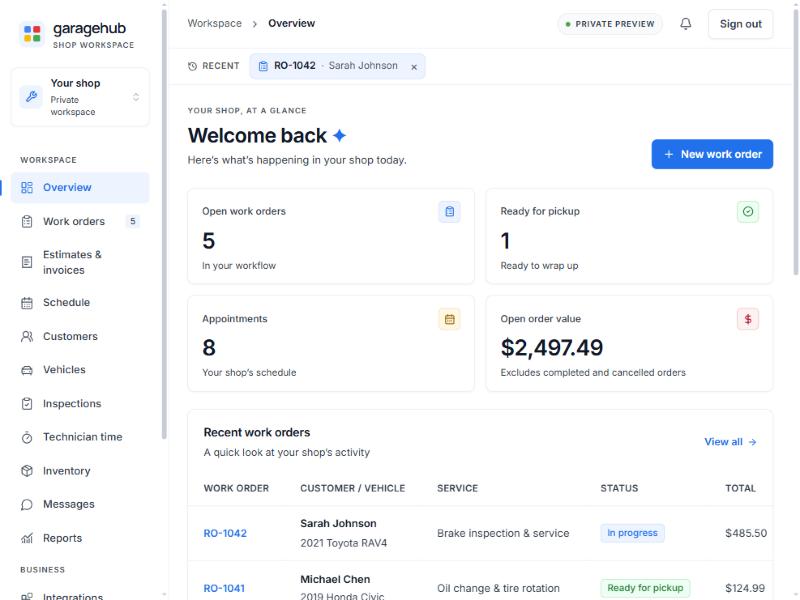
GarageHub overview on a tablet showing metric tiles for open work orders, cars ready for pickup and today's appointments, with a list of recent work orders, using sample data
Preview build with sample data.
Scheduling

Scheduling that shows the bays, not just the clock.

Appointments link to a work order and can carry a bay (sized from your Capacity settings) and a technician, with suggestions from earlier assignments.

  • Bay board: one column per bay plus Unassigned for the chosen day; blocks placed by time and estimated duration (60 minutes assumed, and marked, when none is recorded).
  • Overlaps flagged: same bay at the same time, or the same technician in two bays; nothing is blocked.
  • Week overview, Monday to Sunday: each day’s booked time against what your bays can take, closed days hatched out. Click a day to open its board.
  • Capacity: bays, opening time, hours per day, open days; an advisory daily load strip flags closed days, overbooked slots and load over capacity.
  • An appointment can create its linked work order after you review the service.

Free plan: appointments and check-ins. The bay board, week overview and capacity settings are Pro.

No drag-and-drop yet, no technician availability or time off, no online booking for customers.
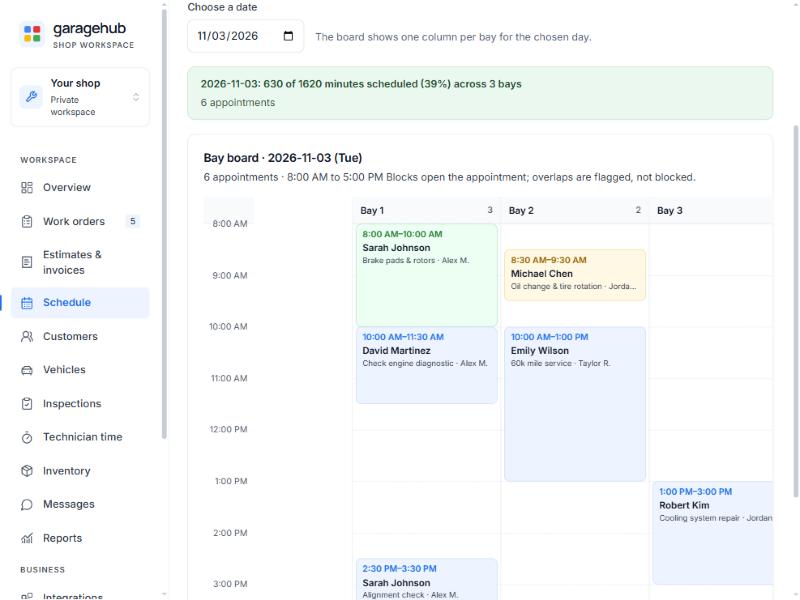
Bay board on a tablet with colour-coded appointment blocks placed by start time across Bay 1, Bay 2 and Bay 3, each showing customer, service and technician
Preview build with sample data.
Check-in & history

One check-in form, saved straight to the vehicle.

“Check in” on the schedule or “Record check-in” on a work order opens one intake form: arrival type, mileage, fuel level, key tag, customer concerns, walk-around notes, belongings, contact preference, promised time and who took it. Saving marks the appointment checked in and updates the vehicle’s mileage in the same step.

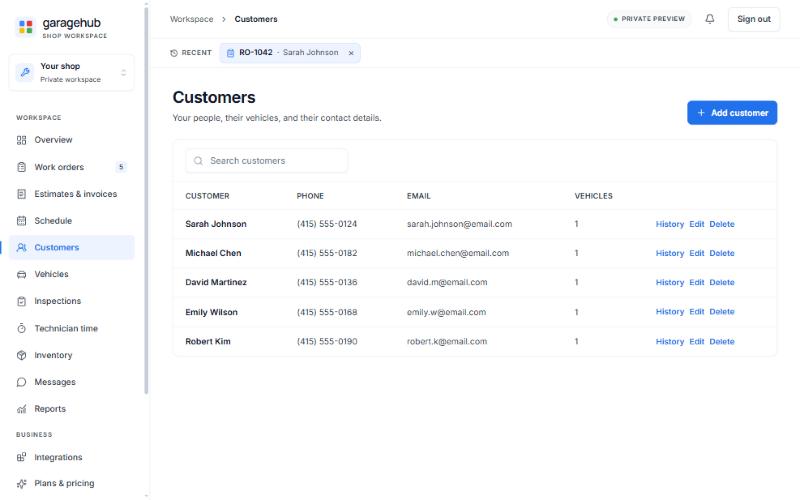
  • Customer records with phone, email and vehicles.
  • Vehicle records with year, make, model, plate and an offline VIN format, check-digit and model-year check (no decode or history lookup).
  • Linked history per customer and per vehicle: work orders, appointments, check-ins, inspections, estimates, invoices.
  • A customer with conversation notes, consent history or reminders can’t be deleted, so the record behind a dispute is always there.

Free plan: 5 customers and their vehicles at a time. Pro: unlimited.

Illustration of a service advisor at a shop counter showing a tablet to a customer holding car keys
Customers list with name, phone, email and vehicle count for each customer, and History, Edit and Delete actions on every row
Preview build with sample data.
Digital inspections

Inspections the customer can actually read.

Build the checklist once in Settings, run it on the tablet beside the car, and let the findings carry their proposed services into the estimate.

  • Checklist templates in Settings, one item per line, up to 100 items.
  • Per item: Not checked / Good / Attention / Immediate / Not applicable, plus a note.
  • Photos on a finding (Pro): JPEG, PNG or WebP up to 5 MB, up to 20 per item, stored privately on the server and never at a public address; video stays a placeholder.
  • A finding can carry proposed services that the estimate imports later.
  • Completed inspections are read-only until reopened.
  • Customer summary link (Pro): item labels and statuses, recommended services without prices, photos; never technician notes or placeholders. The customer acknowledges once by typed name; the acknowledgement approves nothing and is not a payment (approval happens on an estimate review link). Links expire and can be withdrawn.

Free plan: 1 template; photo placeholders (caption and time) instead of uploads.

Summary links are copied into your own text or email. GarageHub sends nothing.

Illustration of a technician beside a raised vehicle holding a tablet with an inspection checklist
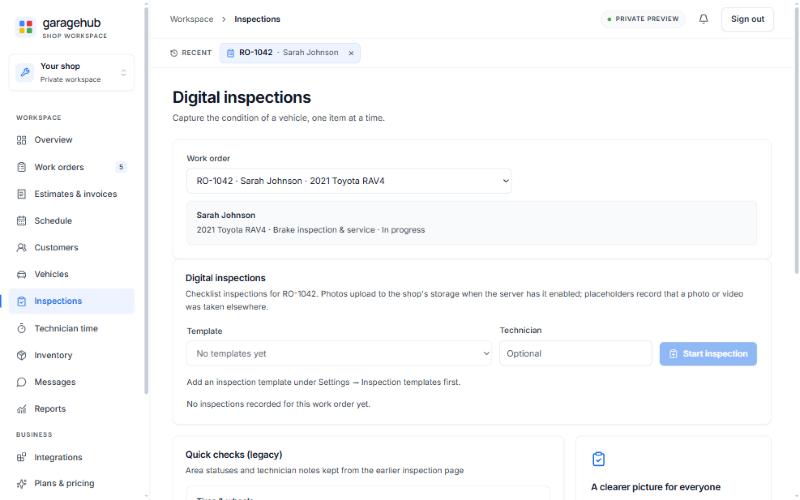
Digital inspections page for work order RO-1042 with template and technician fields and a Start inspection button, before any inspection has been started
Preview build with sample data.
Estimates & approval

Price it once, get a clear answer, keep the record.

An estimate is created from the work order’s saved lines and keeps its own change history.

  • Labor and parts lines, per-line taxable flag and discount, fees, an estimate-level discount; lines inserted from canned services, saved items and inspection proposals.
  • Tax rates you enter (one default); GarageHub doesn’t look up, verify or file tax.
  • Optional unit cost on part lines, never shown to the customer.
  • Customer review link (Pro): create a link, send it from your own phone or email. The customer sees exactly the frozen lines and totals, can mark items as not wanted, and approves or declines with a typed name and a message.
  • Links expire in 1–30 days (default 7), up to five open per estimate, can be withdrawn.
  • Applying the decision records it as the estimate’s authorization.
A review-link decision is an electronic acceptance record, not an identity-verified signature. Decisions given in person or by phone are recorded as an internal authorization note, labelled as such.

What the customer sees, amounts omitted.
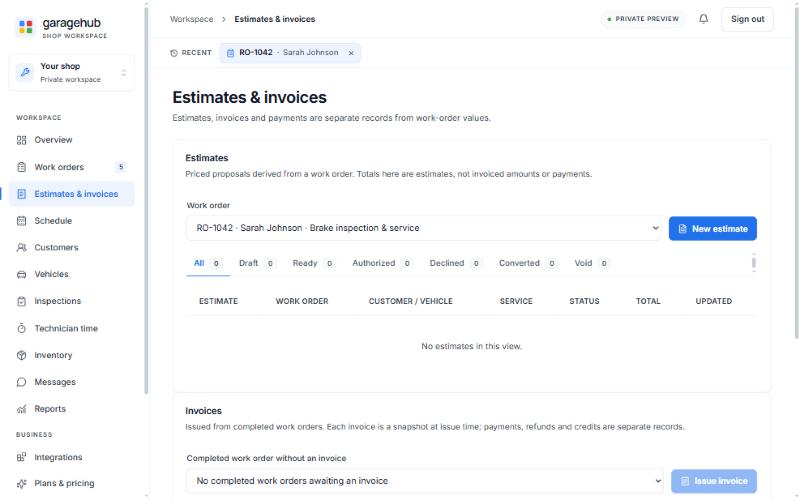
Estimates and invoices page with the work-order selector, status tabs from Draft to Void and the Issue invoice control, before any estimate has been created
Preview build with sample data.
Work orders & invoices

From authorized estimate to issued invoice without retyping.

The work order is where the job lives: its lines, its check-in, every estimate and the invoice, so nothing is retyped between steps.

  • Convert an authorized estimate and its lines, tax rate and In-progress status move onto the work order; a supplemental estimate later adds to it.
  • Marking the order Completed makes it eligible for one active invoice.
  • The invoice is a numbered INV- snapshot of lines, fees, discount, tax, totals and shop details at the moment it’s issued. Totals are checked on the server and the invoice is never edited afterwards.
  • Payments, refunds and credits are append-only; refunds can’t exceed receipts, credits can’t exceed the balance. An invoice can be voided, with a reason, only while no net payments or credits remain recorded against it; void or refund those entries first, then a replacement invoice can be issued.
  • Balance and payment status are derived from the records.
  • Save a set of labor and parts lines as a canned service and reuse it; single saved items too.
  • Work-order CSV export, and an accounting-style CSV of issued invoices and payments.
  • Manual inventory and technician time entries; an assignment view groups current orders by technician.
  • Recently opened records stay one click away, and any page can be shared with a teammate by link.
  • Work orders are cancelled, never deleted, so the history stays whole.

Free plan: up to 10 open work orders at a time. Pro: unlimited.
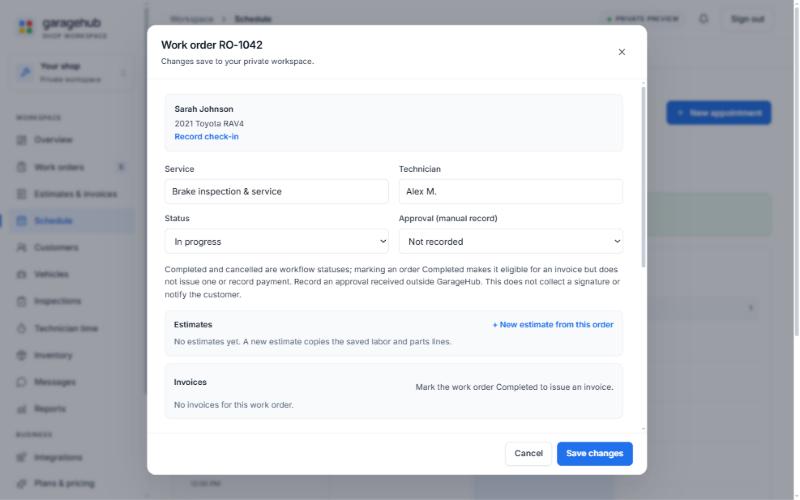
Work order RO-1042 editor with service, technician, status and approval fields, plus the Estimates and Invoices panels
Preview build with sample data.
Customer follow-up

Follow-up that survives a busy afternoon.

Write down each phone call, text and counter conversation on the customer’s record, link it to the job it was about, and set a reminder for whatever you promised. The texts and emails themselves still go through your own phone and inbox.

  • Conversation notes per customer with direction and an optional link to a work order, estimate, invoice or appointment.
  • Reminders and follow-up tasks with due dates and outcomes, surfaced on the overview.
  • Editable message templates with placeholders, rendered locally for copying.
  • Append-only consent history per channel (an internal record, not legal advice).
Nothing is sent, received or scheduled. GarageHub is the record; your phone and email are the channel.

Sample notes.

Staff accountsPro

Staff accounts with the right amount of access.

Give each person exactly the access their job needs. Advisors and managers run the counter and edit anything; technicians see every job and change nothing; the owner alone restores history, manages staff and changes shop settings.

  • Invite staff from Settings → Team with a one-time code you hand over yourself; GarageHub sends no email. They enter the code on the join page and sign in like anyone else.
  • Permissions are enforced on every request, not just hidden on screen.
  • Two-step verification (authenticator app) with eight recovery codes, per account.
  • Owner-issued single-use password reset codes.
  • Disabling an account ends its sessions.
  • Audit log of security events, readable by the owner and managers.
  • One shop per account; this is not multi-location.

Free plan: one owner account, no staff accounts or roles. Pro: unlimited staff with roles and two-step verification.

What each role can do
RoleReadWriteRestore historyManage staffShop settings
Owner
Manager
Advisor
Technician

The owner and managers can also read the audit log.

Reports

Reports from the records you already keep.

All computed from recorded work orders, invoices, payments, time entries and inspections, and labelled as shop records, not reconciled revenue, payroll or tax figures.

Sales by month

Invoiced, collected, credited and outstanding, kept separate.

Receivables aging

Who still owes, and for how long.

Technician time

Recorded time against billed labor hours.

Inspection outcomes

Statuses across completed inspections.

Deferred work

Declined estimates and unpriced inspection proposals to follow up.

Job profitability (parts-cost basis)

Per invoice: revenue excluding tax, parts cost, parts margin and gross margin before labor cost, with the count of part lines that have no recorded cost.

Labor cost, overhead and payroll aren’t recorded, so job profitability is a gross parts margin, not profit.

Also on Reports: a reorder list from your inventory, exportable as CSV, and the accounting-style CSV of invoices and payments. Free plan: the overview page only, no reports.

Your data

Your records are yours.

Download them, keep them, restore them, on either plan.

  • Download your whole workspace from Settings at any time as a single file.
  • GarageHub keeps up to 50 saved snapshots; the owner can restore any of them.
  • Restore from a downloaded file, with the current version confirmed first so nothing is overwritten by accident.
  • CSV exports: work orders, an accounting-style file of invoices and payments, the reorder list.
  • Nothing is deleted silently: invoices are voided with a reason, payments are voided not erased, work orders are cancelled not removed.

Inspection photo files are stored separately from the workspace file: they are not included in the download, and during the preview they are not yet covered by GarageHub’s automatic backups.

Not included

What GarageHub doesn’t do (yet).

Read this before you move your shop in.

  • Card or online payment processing — you record payments you took elsewhere.
  • Sending or receiving texts and emails.
  • Parts ordering or supplier catalogs.
  • VIN decoding, vehicle history or labor-guide data (the VIN check is an offline format check).
  • Accounting or bank sync (CSV export only).
  • A native phone or tablet app — GarageHub runs in the browser on a laptop or tablet.
  • Identity-verified e-signatures — review links are electronic acceptance records.
  • Online booking.
  • More than one location per account.

GarageHub is built to connect payment, parts, vehicle-data, accounting and messaging providers later. None is connected today, and when one is we’ll say so here, plainly. If one of these is a must-have for your shop, GarageHub isn’t ready for you yet.

The whole job, one place to keep it.

GarageHub Pro is $99 a month for the whole shop, no per-user fees; GarageHub Free covers one person. Early access is by invitation during the preview.